Green pipeline, empty file
I wanted a contribution grid on my site. The familiar one: fifty-two columns of small squares, darker where you did more that day.
The obvious approach is to call the GitLab API from the page and draw whatever comes back. That does not work, for two reasons that are both worth understanding before you try.
The first is CORS. GitLab’s API does not send headers permitting arbitrary origins to read its responses, so the browser refuses to hand the data to your JavaScript. The request goes out. You just never get to see the answer.
The second is worse. Even if CORS allowed it, authenticating would mean putting a token in client-side JavaScript, and everything in client-side JavaScript is public. You would be publishing a credential on your own website and calling it a feature. 🙃
So the data has to be fetched somewhere trusted and baked into the site before it ships. That somewhere is CI.
The job
stages:
  - prepare
  - build
  - deploy

fetch-activity:
  stage: prepare
  before_script: []
  script:
    - node scripts/fetch-activity.mjs
  artifacts:
    paths:
      - static/activity.json
    expire_in: 1 week
  rules:
    - if: $CI_COMMIT_BRANCH == $CI_DEFAULT_BRANCH
before_script: [] matters more than it looks. My pipeline has a global before_script that runs npm ci, because the site build needs dependencies. This job needs none. Without the override it would install 260 packages every night to run a single file that only uses what ships with Node.
The rules block keeps it off merge request pipelines. Nothing in an MR needs live activity data, and pulling it there would mean exposing the token to any pipeline anyone can trigger.
What I chose not to publish
The script asks GitLab for my events and reduces them to this:
{"2026-08-30": 5, "2026-08-28": 21, "2026-08-27": 40}Dates and counts. Nothing else.
That is deliberate, and it is the decision I would most want someone to copy. My GitLab account has activity in internal work projects. This JSON is served publicly from my own domain. If I stored the raw events, the file would carry project names, branch names, and issue titles from repositories that are not mine to publish, and I would find out about it the day someone read it.
Aggregating first means the file cannot leak anything, regardless of what lands in my event history later. The privacy property holds even when I stop paying attention, which is the only kind of privacy property worth having.
Getting a file from one container to another
Every CI job runs in a fresh container. Nothing survives between them. The job that writes activity.json and the job that builds the site are two different machines that never meet.
Artifacts are the bridge. fetch-activity declares the file as an artifact, GitLab stores it, and every job in a later stage downloads it automatically before running. The Pages build reads a file it never generated and does not know where it came from.
expire_in: 1 week means GitLab deletes its stored copies after a week, so I am not accumulating a year of near-identical JSON.
Keeping it current
A scheduled pipeline runs the whole thing nightly with no commit involved. My rules key off $CI_COMMIT_BRANCH == $CI_DEFAULT_BRANCH, which is true for a scheduled run on the default branch, so the fetch and the deploy both fire. Roughly ninety seconds of compute a day.
The grid updates itself. I never touch it again.
Then it did not work
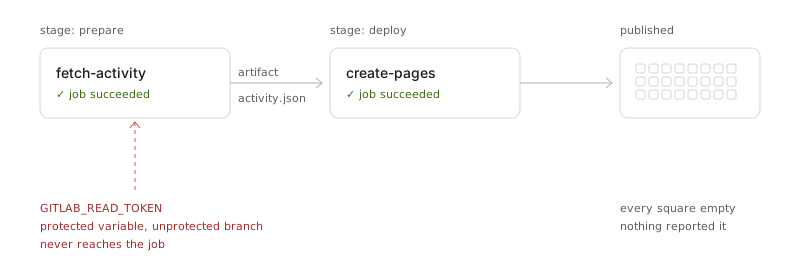
The pipeline was green. The job was green. The published file was {}.
The cause took a while to find, and it is the actual reason I am writing this. I had marked the token as a protected CI/CD variable, which is correct practice: it means the value is only exposed to pipelines running on protected branches, so someone cannot open a merge request that prints your secrets.
But main was not in the protected branches list. I had renamed the default branch early on and never confirmed the protection followed.
Two security settings with a dependency between them. Both configured the way a careful person would configure them. Together, they silently produced nothing.
The mitigation caused the failure
Here is the part I keep thinking about.
My script does not error when the token is missing. It writes an empty object and exits zero, so that local builds and merge request pipelines keep working without credentials. That is good practice. Every guide will tell you to degrade gracefully rather than explode.
That graceful degradation is precisely what turned a misconfiguration into a silent one.
A hard failure would have told me in thirty seconds, with a red pipeline and a stack trace pointing at the exact variable. Instead I got two green checkmarks and a page that looked slightly wrong in a way I might not have noticed for a month.
The fix is not to remove the fallback. It is to make the two cases distinguishable: fail loudly when a token is expected and absent, degrade quietly only when it was never expected. if (CI && !TOKEN) throw is one line, and it is the line I skipped.
Where this actually matters
I spend my working hours around public sector software delivery, and this failure mode is not a personal-site problem. It is the shape of most quietly broken compliance pipelines.
A security scan job whose rules stopped matching after a branch rename, skipping instead of failing. An evidence artifact that uploads successfully and is empty. An audit trail that has been faithfully collecting nothing since a config change eight months ago.
Nobody catches these, because everybody checks whether the pipeline is green, and it is. Green means no job reported failure. It does not mean any job did anything.
A control you have never watched fail is not a control. It is a config file you are hoping about. The only way to know the difference is to break it on purpose and confirm it complains.
I found mine by accident, on a grid of squares that nobody depends on. That is the cheapest possible place to learn it.