How I build Claude skills: start with the workflow
When I build a workflow with Claude, I start by figuring out how I would do the work myself.
What do I need first? What can happen at the same time? What depends on something else being finished? Where do I need to stop and make a decision?
Once I can answer those questions, writing the skills gets a lot easier.
In my last post, I wrote about realizing that getting an AI workflow to work and being able to explain it are different things. This is the practical side of that: how I break the work down, where I put the instructions, and how I keep myself involved.
First, which Claude are we talking about?
“Claude Desktop versus Claude Code” is a little confusing because Claude Code can also run inside the desktop app. The distinction I care about is the kind of work I am asking it to do.
| Where I would start | What I would use it for |
|---|---|
| Claude chat, in the desktop app or browser | Working through an idea, reviewing supplied documents, and preparing a briefing or other artifact. |
| Cowork, in the desktop app | Delegating work across files and connected tools in a more guided workspace. |
| Claude Code, in a terminal, editor, or desktop interface | Working in a project folder, changing files, running scripts, and keeping the workflow in version control. |
Anthropic’s desktop documentation explains the Claude Code interface in the app.
For someone starting with documents and a recurring briefing, I would start in chat or Cowork. For a workflow built around a repository and repeatable scripts, I would use Claude Code.
A skill is a reusable set of instructions, with optional supporting files. The basic format can travel between environments, but the tools and files available to it still matter. A skill expecting a local script or a connected system cannot assume it has that access everywhere.
That is why I pick the environment based on the workflow. Having more tools available does not automatically make the workflow better.
Map the work before writing the skills
My first step is to identify one workflow with a clear finish line.
“Automate my job” is too broad. “Prepare a sourced briefing from these approved public documents for a department leader to review” is something I can map.
Let’s use that as a hypothetical public-sector example. It is a teaching example, not a claim that I have deployed it in an agency.
The input is a question, an audience, and a set of approved public documents. The output is a draft briefing that a person can check and decide whether to use.
I would break it into three stages:
| Stage | Input | Expected output |
|---|---|---|
| Frame | The request, intended reader, and supplied documents | An agreed question, scope, and source list |
| Gather | Approved scope and sources | Evidence with citations, plus conflicts and gaps |
| Draft | Reviewed evidence | A briefing that separates findings, uncertainty, and options |
Inside a stage, I might have more than one skill. One could extract relevant facts while another checks document dates and versions. Those tasks can happen side by side once the source list is approved.
The draft depends on both outputs being ready and reviewed. It should not start just because one task finished first.
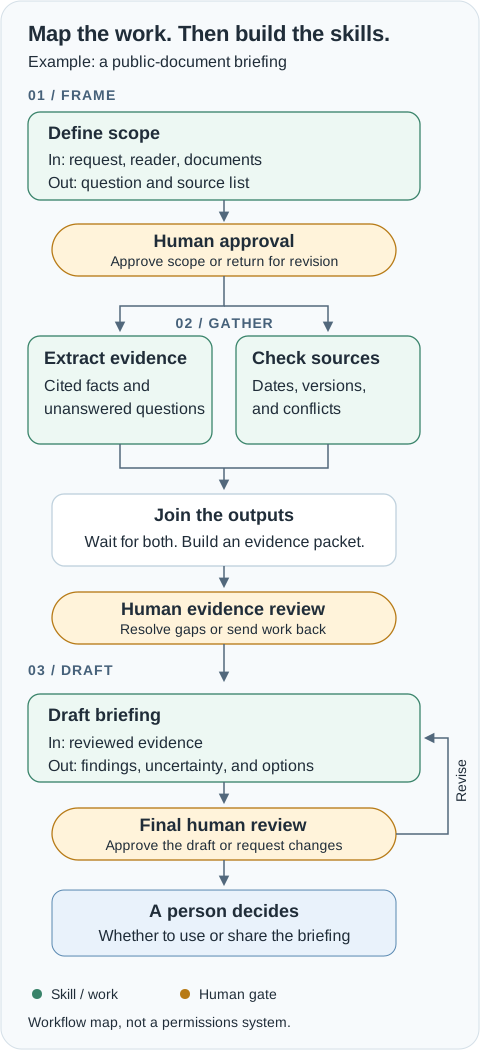
I like to ask Claude to make this map as a visual artifact before creating anything else. Seeing it usually makes missing steps much more obvious than a paragraph does.
Here is a prompt I would use:
Help me map a recurring workflow before we create skills.

Workflow: prepare a briefing from supplied public documents.
Audience: a department leader.
Output: a sourced draft for human review.

Break it into stages. For each stage, show its input,
expected output, proposed skills, and dependencies.
Show which tasks can run side by side and where their
outputs join. Mark human approval before decisions,
between stages, and before anything is sent or published.
Show where rejected work returns for revision.

Ask about missing requirements. Do not invent sources
or assume access to systems. Create a visual artifact
or a Mermaid diagram with a plain-language explanation.
The map is a proposal. I still have to review whether it describes the way I actually want the work done.
Keep each skill small and specific
I try to keep the core instructions for each skill under 50 words. Sometimes shorter.
That is my preference, not a Claude requirement. I mean the instruction body, not a rule that the entire folder, metadata, examples, and reference material must fit into 50 words.
The point is to make the job easy to understand. If I cannot say what a skill takes in and hands back, I probably have not defined it well enough yet.
For the briefing example, a small skill might look like this:
---
name: extract-evidence
description: Extract cited facts from an approved document set for a briefing.
---

Input: approved question and documents.
Extract relevant facts with document, date, and page or section citations.
Output: an evidence table and unanswered questions.
Do not infer missing facts.
Return both to the briefing coordinator; it must wait for source-version checks before requesting human review.
The instructions are short, but the handoff is specific. The next step gets something it can use.
A second skill could check whether each supplied document has a clear date, whether different versions disagree, and whether an older version has been superseded. Its output would be a source-status table with unresolved conflicts. If it cannot establish which version applies, it should flag that for review.
Those are different jobs with different outputs. That makes them worth separating.
I would not create a separate skill for every sentence in a checklist. If two steps always happen together and there is no useful handoff between them, I would keep them together. Too many tiny skills can make the workflow harder to follow.
Longer examples, templates, or reference rules can live in supporting files. Short instructions should still point to everything needed to do the job properly.
Give the workflow a spine
I think of the whole system as having a spine: a coordinating instruction that keeps track of where the work is and what has to happen next.
Each skill handles a specific piece and hands its result back. The coordinator knows the dependencies and where to stop.
For our example, that coordinating instruction could be:
Begin with define-scope and request human approval.
After approval, use extract-evidence and check-source-versions.
These are independent tasks; parallelize only if supported.
Wait for both outputs. Combine them into an evidence packet.
Request human review before using draft-briefing.
Return the draft for final review. Do not send or publish it.
If scope changes, repeat the affected steps and reviews.
In Claude Code, I can put that procedure in a coordinator skill. I keep the root CLAUDE.md focused on shared context and pointers rather than putting every procedure into it. Anthropic also distinguishes project instructions, skills, hooks, and subagents.
When I say one skill “calls” the next, I mean Claude follows the handoff and invokes the relevant skill. A Markdown file does not become a background worker by itself, and drawing two boxes side by side does not make them run concurrently.
In Claude Code, subagents can handle independent tasks when that is appropriate. In a simpler session, Claude can do the same tasks in sequence and still preserve the dependency: both outputs must exist before moving forward.
For me, clear handoffs matter more than making everything run at once.
Put the human gates where they matter
I usually put a review between stages. I also put one wherever a decision needs to be made.
In this example, I would approve the question and sources first. Then I would review the evidence, especially conflicts and missing information. Finally, I would review the draft and decide whether to use or share it.
The approval needs to be specific. “Looks good” on the source list should not count as approval to publish a finished briefing later.
My rule is that Claude can gather information, organize it, and lay out options. I keep the consequential decisions with a person. For this workflow, that includes accepting the scope, resolving important source conflicts, and authorizing distribution.
That does not mean I need to approve every heading or formatting choice. It means I have to identify which decisions carry authority before I automate the work.
A gate also needs to show me enough to review. I want the proposed output, the supporting evidence, the unresolved questions, and a clear explanation of what I am approving.
And writing “ask for approval” in a skill is not a technical lock. For a real deployment, I would also restrict tool access and keep sending, publishing, or changing official records behind an enforceable approval step. A diagram with review boxes is not enough if the agent still has unrestricted write access.
Install it where you will use it
For Claude chat and Cowork, custom skills can be packaged as a ZIP containing the skill folder, then uploaded and enabled through Customize > Skills, subject to account and organization settings. Anthropic’s custom skill guide and skills setup guide show the current steps.
For a project-local Claude Code skill, save the example at:
.claude/skills/extract-evidence/SKILL.mdThen invoke it with /extract-evidence, or let Claude select it when the task matches its description. Project skills can be committed with the repository. Account skill syncing also exists in supported sessions; the Claude Code skills documentation explains where skills load.
I would start with one skill and verify that it loads and returns the expected output before adding the rest of the workflow.
Test the handoffs, too
Once the skills exist, I test more than a clean example.
What happens if a document has no date? If two sources disagree? If one parallel task finishes but the other fails? If I reject the evidence packet? If someone asks Claude to skip review because they are in a hurry?
I want it to surface the problem and stop at the right point, rather than fill the gap and produce something that looks finished.
When I change a skill, I rerun those examples. Claude can propose a better instruction, but I review that change before treating it as part of the workflow.
This is the part that makes the map useful after the first build. When something fails, I can look at the stage, the input, and the handoff instead of rewriting the entire system.
If you are getting started, pick one task you already understand. Map it. Write down what goes into each stage and what should come out. Add the reviews. Then create the smallest set of skills that can do that work.
That is how I build mine. The useful part starts with knowing what the work is supposed to accomplish and where I still need to be involved.